 Study Plan
2110 Topo
Study Plan
2110 Topo
The Networked Media Open Specifications (NMOS) act as the "control plane" for your ST 2110 infrastructure. While ST 2110 defines how to move the data (the "data plane"), NMOS provides the standardized language devices use to talk to each other, discover resources, and manage connections.
 ST 2110 defines how media packets move, but NMOS provides the management layer that allows a central controller to discover devices and set up connections between them.
Using IP, "routing" is a software process. Without NMOS, you would have to manually configure every multicast address, port, and SDP file on every device. NMOS automates this, providing a virtual "router" interface for the engineer.
The good thing about a central database is that it stores the entire inventory of the facility, allowing a controller to instantly query all available sources without having to "scan" every individual device on the network.
First we will look at IS-04 Registration.
NMOS IS-04 is the standard for Discovery and Registration in ST 2110 systems. It allows devices to automatically announce their presence and capabilities on the network.
NMOS IS-04: Discovery & Registration
IS-04: A registry-based discovery system. Devices self-register, and any controller or receiver can discover them dynamically. It is designed for many-to-many IP fabric environments.
How Does a Device Know Which Registry to Query? (NMOS IS-04)
In NMOS IS-04, a device (Node) must first know the address of the Registry Service before it can register itself or discover other devices. Here’s how this works in practice:
Common Methods (Ranked by Usage)
- Manual Configuration (Most Common)
The administrator manually enters the Registry IP address or hostname in the device’s web interface during setup. - DNS Service Discovery (SRV Records)
The device automatically looks up a standard SRV record such as:
_nmos-registration._tcp.yourdomain.local - mDNS (Bonjour / Zero-Config)
Used in smaller systems for automatic discovery without a central Registry. - DHCP Option
The DHCP server can automatically push the Registry address to devices.
What Happens After the Device Knows the Registry Address?
-
It sends a registration request (POST) to the Registry with its Node, Device, Sender, and Receiver information.
- It sends periodic heartbeats to keep its registration active.
- It can query the Registry to discover other devices and their SDP files.
A device doesn’t automatically “know” the Registry — it must be told the address through manual configuration, DNS, or DHCP. In professional 2110 facilities, this is typically configured once during system commissioning and is a key part of a reliable NMOS deployment.
What a 2110 System Designer Needs to Know
- IS-04 is the modern, preferred replacement for SAP.
- It enables automatic discovery and works hand-in-hand with IS-05 for connection management.
- Requires a reliable Registry (often deployed redundantly).
JSON Examples
Example: Node Registration (Simplified)
	{
	"id": "3d2f8c7e-8b4a-4f2e-9c1d-5e6f7a8b9c0d",
	"name": "Studio Camera 1",
	"type": "device",
	"version": "v1.2",
	"caps": {
		"sources": 4,
		"flows": 4,
		"senders": 4
		}
	}
Example: Sender SDP Reference
	{
	"id": "sender-uuid-1234",
	"flow_id": "flow-uuid-5678",
	"transport": "rtp",
	"data": {
		"source": "239.100.101.102:50000",
		"sdp": "v=0\no=- ... a=fmtp:96 sampling=YCbCr-4:2:2 ..."
		}
	}
How Parameters Are Implemented
- Most devices auto-register on boot.
- Registry IP is usually set via web UI or DHCP option.
- Devices push JSON data structures to the Registry via HTTP/HTTPS.
- Controllers query the Registry using REST API calls.
Unlike RTSP’s direct client-server model, IS-04 provides a scalable, fabric-wide discovery system using JSON-based registration. A well-implemented IS-04 Registry is the foundation of modern 2110 orchestration and greatly reduces manual configuration.
NMOS IS-05: Connection Management
NMOS IS-05 is the standard for Connection Management in ST 2110 systems. While IS-04 handles discovery (finding devices), IS-05 is responsible for actually making and breaking connections between senders and receivers.
How IS-05 Works
IS-05 allows a central controller (or automation system) to tell a Receiver which Sender it should connect to. It uses a REST API to:
- Stage a connection (prepare it)
- Activate the connection
- Remove or change connections
What a 2110 System Designer Needs to Know
- IS-05 works closely with IS-04 — you need discovery before you can make connections.
- It enables dynamic, software-controlled routing instead of physical patch panels or traditional routers.
- Supports both unicast and multicast transport.
- Provides “hitless” switching capabilities when properly implemented.
- Most modern 2110 devices support IS-05 for both senders and receivers.
Key Concepts: Staged vs Active
- Staged: The connection is prepared but not yet active.
- Active: The receiver immediately begins listening to the sender’s stream.
NMOS IS-05: Connection Management — Additional Details
IS-05 is the NMOS specification responsible for making and breaking connections between Senders and Receivers in an ST 2110 system. It turns discovery (IS-04) into actual usable video, audio, and data flows.
IS-05 Core Concepts
- Staged vs Active Connections
IS-05 uses a two-step process: You first stage a connection (prepare it), then activate it. This allows precise timing control. - Activation Modes
- activate_immediate — Connect right away
- activate_scheduled — Connect at a specific future time (for clean switching)
- Master Enable
A key parameter that tells the receiver whether it should actively listen to the stream or stay in a disabled state.
Additional Important Information
- IS-05 uses the SDP from the Sender (discovered via IS-04) to tell the Receiver exactly how to connect.
- Supports both multicast and unicast transport.
- Enables hitless switching when combined with ST 2022-7 (Seamless Protection Switching).
- Allows bulk operations — a controller can connect hundreds of receivers at once.
- Provides detailed status feedback (e.g., connection state, errors, transport parameters).
Practical Use Case
A production controller wants to switch a multiviewer from Camera 1 to Camera 2. It uses IS-04 to discover both senders, then uses IS-05 to send a new connection command to the multiviewer’s receiver. The switch can happen immediately or scheduled for a clean cut.
SDP Exchange and Connection Setup in NMOS
One of the most powerful aspects of the NMOS ecosystem (IS-04 + IS-05) is how it automates the exchange of SDP files and the setup of connections between devices.
The Traditional Manual Process
In early 2110 systems, an engineer had to:
- Manually copy the SDP file from the sender device
- Manually load that SDP file into the receiver (multiviewer, recorder, etc.)
- Ensure all parameters (multicast address, port, format details) were correct
This was time-consuming and error-prone.
How NMOS Automates SDP Exchange
The modern workflow using NMOS is fully automated:
- Discovery (IS-04)
The controller queries the NMOS Registry and retrieves detailed information about the Sender, including its complete SDP file. - SDP Retrieval
The controller receives the full SDP directly from the Sender via the IS-04 API. - Connection Command (IS-05)
The controller sends the SDP (or the critical parameters from it) to the Receiver using an IS-05 connection request. - Activation
The Receiver applies the SDP and begins listening to the correct multicast address and decoding the stream.
Why This Matters
- Eliminates manual SDP file handling and copy-paste errors
- Enables dynamic, real-time routing changes
- Supports complex productions where sources and destinations change frequently
- Allows controllers to make hundreds of connections quickly and reliably
The combination of IS-04 and IS-05 automates the entire “handshake” process. The controller retrieves the SDP from the Sender and intelligently pushes it to the Receiver. This removes tedious manual configuration and is one of the biggest operational advantages of a properly implemented ST 2110 + NMOS system.
IS-05 is what makes your 2110 system feel like a modern software-defined router. It replaces manual SDP loading and traditional video routing with dynamic, controllable connections. A good understanding of staged activation, master_enable, and proper error handling is essential for building reliable 2110 facilities.
Example JSON (Simplified IS-05 Connection)
{
  "sender_id": "sender-uuid-1234",
  "transport_params": {
    "source_ip": "239.100.101.102",
    "source_port": 50000
  },
  "activation": {
    "mode": "activate_immediate"
  }
}
Implementation Notes
- Controllers send REST commands (POST/PATCH) to the Receiver’s IS-05 endpoint.
- Devices expose their connection capabilities through IS-04.
- Most broadcast controllers (Lawo, Imagine, Riedel, etc.) use IS-05 under the hood.
IS-05 turns your 2110 network into a software-defined routing system. Together with IS-04, it eliminates the need for manual SDP loading and traditional video routers in many cases. A solid understanding of both IS-04 and IS-05 is essential for anyone designing modern ST 2110 facilities.
NMOS IS-06: Network Control
NMOS IS-06 is the specification for Network Control within the NMOS family. While IS-04 handles discovery and IS-05 handles connection management between senders and receivers, IS-06 allows the NMOS controller to directly control the underlying network devices (switches and routers).
Even if you have a fully functional NMOS system with IS-04 (Discovery) and IS-05 (Connection Management), IS-06 becomes essential when dealing with high-bandwidth ST 2110 video streams for the following reasons:
- IS-05 Only Controls the Endpoint — Not the Network
- IS-05 tells a Receiver to listen to a specific multicast address from a Sender.
- However, it does not automatically configure the network switches to actually forward that multicast traffic efficiently.
- Without IS-06, the network may still require manual configuration of multicast routes, IGMP queriers, or QoS settings.
- High-Bandwidth Video Needs Precise Network Behavior
Uncompressed (or lightly compressed) 2110-20 video streams are extremely demanding: - Very high data rates (1.5 Gbps → 12+ Gbps per stream) Large packet sizes
- Strict timing requirements
- What IS-06 Specifically Provides
IS-06 allows the central NMOS Controller to programmatically talk to the network switches and: - Dynamically create / remove multicast routes when connections are made or broken
- Apply correct QoS policies on the relevant ports
- Manage bandwidth reservations and traffic engineering
- Monitor network health for media flows
- For these streams to work reliably, the network fabric must be actively configured to:
- Create efficient multicast trees (so traffic only goes where it’s needed)
- Apply proper QoS markings (CS5 for video)
- Prevent buffer overflow by controlling packet forwarding behavior
- Optimize paths to reduce jitter and packet loss
In a small or simple 2110 system, you can often get away with static switch configuration. But in a true NMOS-controlled production environment with many high-bandwidth video flows, IS-06 is what turns the network into a software-defined media fabric.
Without IS-06, the controller can tell devices what to connect to, but it cannot guarantee the network itself will behave correctly under heavy video load. This is why full NMOS orchestration (IS-04 + IS-05 + IS-06) is considered the gold standard for large, professional ST 2110 deployments.
How IS-06 Works
IS-06 enables a central controller to programmatically configure the network fabric, including:
- Creating and removing multicast routes
- Setting up IGMP / PIM routing
- Applying QoS policies (DSCP markings)
- Configuring VLANs and other network parameters
What a 2110 System Designer Needs to Know
- IS-06 is the bridge between the media layer (IS-04/IS-05) and the actual network infrastructure.
- It allows for fully automated, software-defined networking in 2110 systems.
- Not all switches support IS-06 yet — it requires network hardware with a compatible control interface (usually REST API or NETCONF).
- It is especially valuable in large or frequently changing facilities where manual switch configuration becomes impractical.
- Works together with IS-04 and IS-05 to create a complete orchestration system.
Key Capabilities
- Dynamic multicast route creation when a receiver connects to a sender
- Automated QoS configuration for video, audio, and PTP traffic
- Network path management and monitoring
IS-06 completes the NMOS ecosystem by giving the controller direct control over the network switches. While IS-04 and IS-05 are widely adopted, IS-06 is still maturing. Understanding IS-06 is important if you are designing large-scale or highly automated 2110 facilities where full software-defined networking is desired.
NMOS IS-08: Audio Channel Mapping
IS-08 is the NMOS specification that handles audio channel mapping and shuffling in ST 2110 systems. It represents a major upgrade over traditional SDI audio handling.
How Audio Was Handled in SDI (Legacy Limitations)
- Audio was embedded directly into the SDI video signal (max 16 channels per link).
- Channels were locked into fixed groups of 4.
- Routing audio usually meant routing the entire video signal.
- Remapping individual channels required dedicated embedders/de-embedders or physical patching.
- Very rigid and labor-intensive for complex productions.
How IS-08 Improves Audio in ST 2110
Because audio travels as a separate essence (ST 2110-30), IS-08 allows dynamic, software-controlled channel mapping at the receiver:
- Receivers can select and reorder individual channels from one or multiple sources.
- Controllers can instantly create custom mixes (e.g., different language versions, clean feeds, etc.).
- Supports far more than 16 channels.
- Receivers only process the channels they actually need.
Key Advantages Over SDI
- Granular Control — Map or shuffle any channel independently
- Flexibility — Create unique mixes for different destinations
- Automation — Change mappings instantly via controller
- Scalability — Handles large numbers of audio channels
IS-08 transforms audio from a rigid, hardware-dependent process in SDI into a flexible, software-defined capability. It gives production teams much greater creative freedom while significantly reducing physical audio infrastructure.
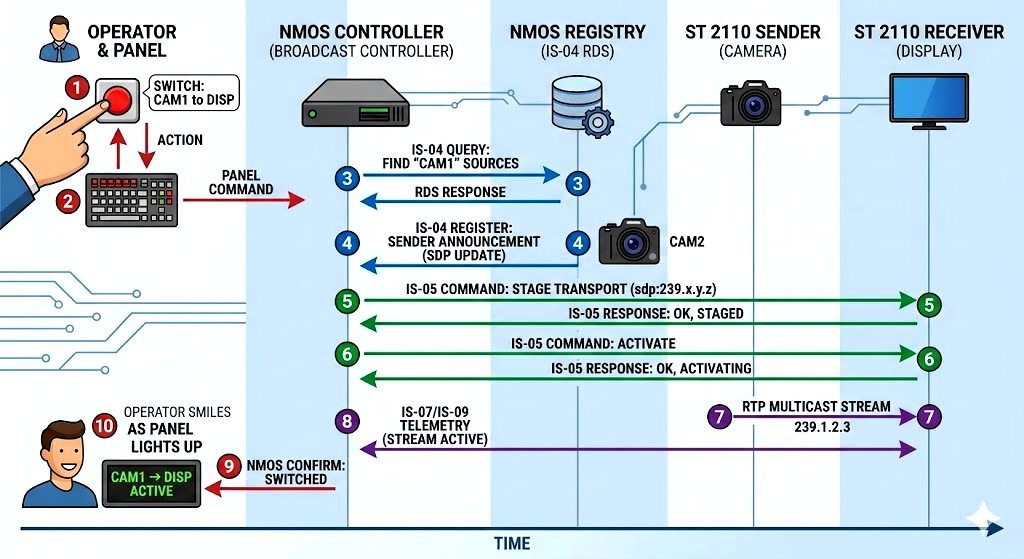 Another way to look at it
- Operator presses button on a Router Control Panel
- The Router Controller receives the command
- Controller queries IS-04 Registry for Sender B’s SDP
- Controller sends IS-05 connection command to Receiver
- Receiver stages the new connection
- Receiver activates the connection (joins new multicast address)
- Network switch (via IS-06 if implemented) updates multicast forwarding
- Receiver begins decoding the new stream
